


AI Product Video Generator from Images | BeikeShop

BeikeShop Official Website: beikeshop.com
BeikeShop is a premier open-source e-commerce system built on the Laravel framework. Specifically designed for cross-border trade, it offers a fully customizable, multi-language, and multi-currency solution for businesses looking to scale their independent global storefronts.
Your Products Already Have Images. Do They Still Need Videos?
Product videos can be more engaging for shoppers than static images. For many independent-store merchants, however, the real question is not whether video is valuable, but how much time and money it takes to produce.
Reshooting products, preparing scripts, and editing footage are difficult to turn into routine tasks, especially for stores with large catalogs or frequent product launches. Even with a standalone AI video tool, merchants often need to download product images, switch platforms, learn how to write prompts, wait for the result, and then upload the finished video back to the store.
What if you could use the product images already in your store to generate a usable product video quickly?
That is the problem the BeikeShop AI Product Video Generator Plugin is designed to solve.
There is no universal answer to whether AI product videos will work for every merchant. Instead of relying only on a feature description, try the plugin with one of your own product images and decide whether the result fits your products and marketing workflow.
For ¥5, Let Your Own Product Provide the Answer
To make the first trial more accessible, the purchase price of the AI Product Video Generator Plugin is now ¥5.
Your first purchase also includes ¥10 in video generation credits. Once the plugin is installed, you can generate videos directly from the BeikeShop product editor. If you want to keep using it, simply top up your credits as needed. Video generation is billed by duration, with costs starting from ¥0.20 per second.
Please note: ¥5 is the purchase price of the plugin. Each video generation task consumes credits based on the selected duration and the actual task.
👉 Try the AI Product Video Generator Plugin for ¥5
Generate Videos Directly in the Product Editor
After installing the plugin, your operations team does not need to open another AI platform. Go to the product editor, upload or select an existing product image, and click AI Video Generation to start a task.

The workflow is straightforward:
- Open the product editor.
- Upload or select a product image.
- Click AI Video Generation.
- Wait for the video to finish generating.
- The completed video is automatically added to the product's Images/Videos section, ready to use.
The plugin automatically reads the product images, organizes the reference materials, submits the generation task, and checks its progress. When the video is complete, it is written back to the product media library, while the generation history is retained. This reduces the need to move assets back and forth between different platforms.

Start Generating Even If You Do Not Know How to Write Prompts
With many AI video tools, users get stuck at the first step: what should the prompt say?
With this plugin, entering a prompt is optional. The system analyzes the subject and visual content of the product image, automatically generates and refines a description that the video model can understand, and then submits the video task.
If you already have an idea for the scene, you do not need to use complex technical language. A simple description is enough, for example:
- Slowly push the camera forward to highlight product details.
- Have the model turn naturally to show the garment.
- Add dynamic lighting to create a stronger atmosphere.
- Give the overall scene a more commercial, advertising-style look.
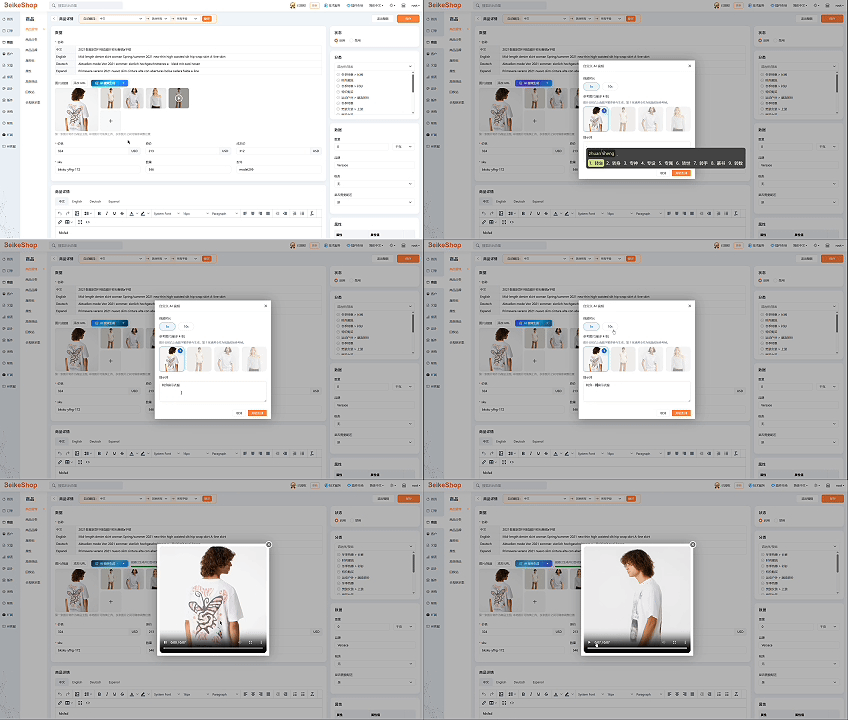
The system expands and optimizes these descriptions using the product image as context. You express the idea; AI handles the prompt refinement.
Which Scenarios Are Worth Trying?
This plugin is designed primarily for ecommerce product presentation rather than narrative short films or complex video production. It is particularly suitable for:
- Animating a main product image: Add camera movement, subtle product motion, or lighting changes to a static image.
- Fashion and model presentations: Experiment with natural turns, fabric movement, and other dynamic effects.
- Detail and lifestyle shots: Add atmospheric content for jewelry, beauty products, home goods, and similar categories.
- Faster product launches: When no video is available, generate a short clip for the product page or marketing content.
- Campaign content: Prepare different product assets for social media, ad testing, or promotional pages.
If your product depends on precise dimensional demonstrations, complex mechanical movement, or perfectly unchanged text, trademarks, and structural details, review the AI-generated result especially carefully.
AI Video Is Not Magic—Review the Result Before Publishing
AI infers movement and camera changes from the reference image, so results will vary across images and products. Even when using the same image, you may need to adjust the description or generate another version to achieve a more suitable result.
Before publishing a video on a product page or using it in an advertisement, check the following:
- Are the product's shape, color, and key details accurate?
- Have any brand marks or packaging text changed?
- Do the model's limbs and the product's movement look natural?
- Are the aspect ratio and pacing suitable for the intended channel?
The plugin is not intended to replace every product shoot or professional video production workflow. Its value is in lowering the operational barrier to trying product video. For suitable products, it gives existing images another way to present the item. For unsuitable products, it helps you reach that conclusion early at a relatively low cost.
You Do Not Have to Take Our Word for It—Try Your Own Product Image
Whether AI product video is right for your independent store ultimately depends on the result generated from a real product and whether you would use it on a product page, promotional page, or in your marketing content.
The BeikeShop AI Product Video Generator Plugin is now available for ¥5, and the first purchase includes ¥10 in video generation credits. Choose a product you know well, generate a video from your own image, and then decide whether this is the right tool for your store.
👉 View and Purchase the AI Product Video Generator Plugin
If you have already tried it, we also welcome feedback about your product category, the generated result, and how you used the video. Real-world experience will help us continue improving the plugin.
Welcome to contact us! Email: marketing@guangda.work
Click the link to learn about the product: https://beikeshop.com/
All rights reserved. Reprint must indicate the source!