Plugin Details
Home / Plug-in market / Admin Image Format Converter & Compressor (WebP)


Admin Image Format Converter & Compressor (WebP)

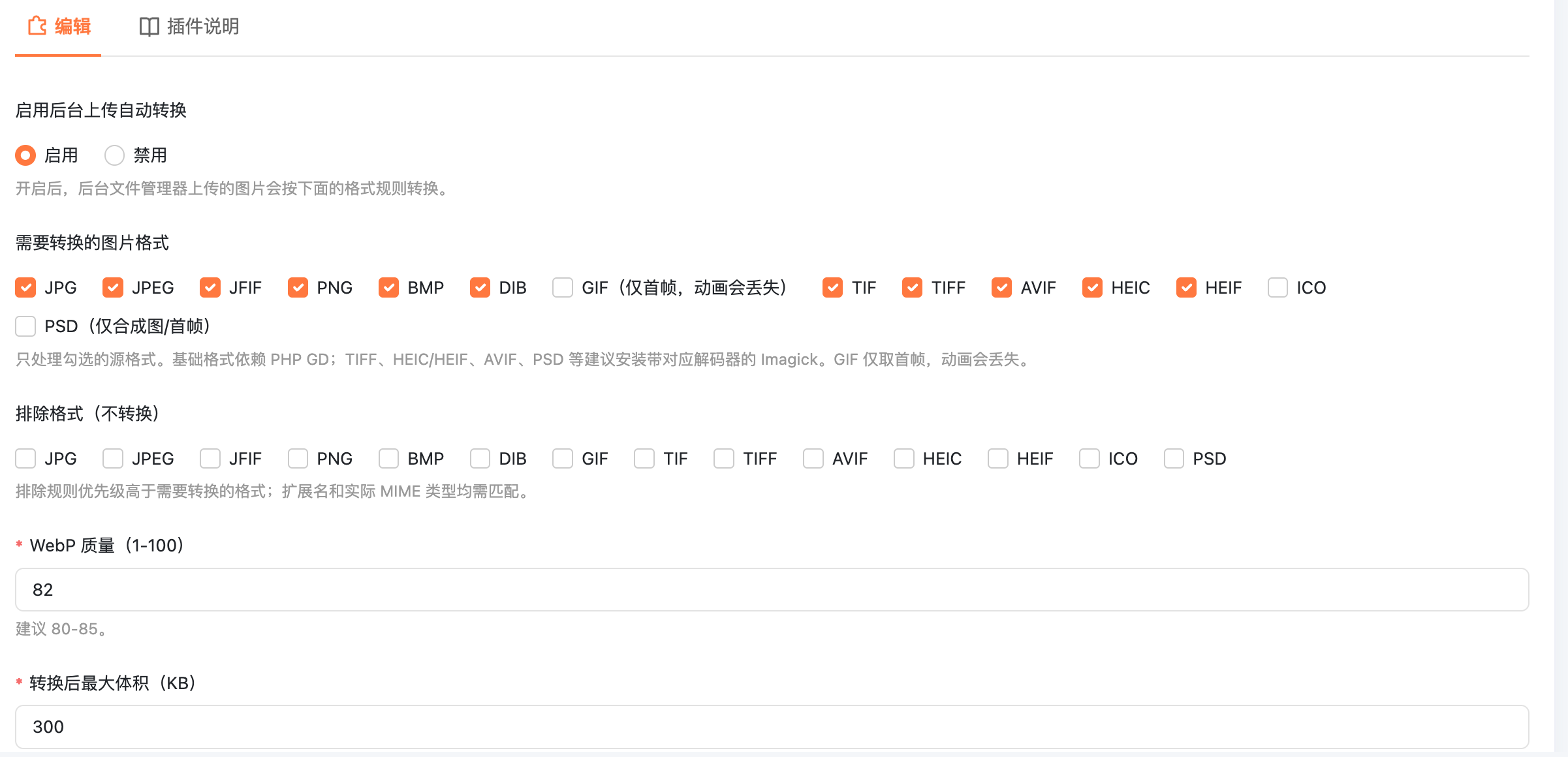
Back-end image WebP conversion plugin (BeikeShop) Technical support QQ:2651785148 ! image.png "## Function
- Supports setting the maximum volume after conversion (KB), with a default of 300 KB. The converted WebP is guaranteed not to exceed this upper limit. First, code according to the set quality. If it meets the requirements, save it directly (the small image will not be reduced in size). If the limit is exceeded, first reduce the mass to 35. If it still exceeds the limit, then estimate the scaling ratio in one step based on the relationship between volume and pixel count, rather than trying and making mistakes step by step. After decoding, the long side should be retained at most 3200 px to avoid repeatedly encoding the extremely large original image.
- If the ImageMagick of the server ignores the quality parameter for WebP (such as the default ImageMagick 6.9.12 + libwebp in Ubuntu 24.04), The plugin will automatically detect and switch to libwebp's 'target-size' to control the size.
- Automatically correct in EXIF direction (vertical photos taken by the phone will not become horizontal), and CMYK images will automatically convert to sRGB. Convert Chinese file names to pinyin. When there is a duplicate name, a unique name will be automatically generated. The uploaded file name will be automatically converted to lowercase pinyin /ASCII, for example, "Red dress.jpg" will be converted to "hong-se-lian-yi-qun.webp". When there is a duplicate name, call the unique file name mechanism of BeikeShop to append the UUID to avoid overwriting existing files. Images that are excluded from conversion will be saved in their original format, but the file names will still be standardized to pinyin. Replace the background file management service through the 'controller.file_manager.construct' extension point without directly modifying the core service class. When uploading through the background file manager, convert the image to WebP by clicking the options selected in the background.
- Supports selection of conversion/exclusion: JPG, JPEG, JFIF, PNG, BMP, DIB, GIF, TIF, TIFF, AVIF, HEIC, HEIF, ICO, PSD. -WebP does not repeat conversions; Keep the MP4 as it is. Save the unselected files as they are. Files that are checked for conversion but cannot be decoded by the server will prompt a format decoding failure. The GIF conversion only takes the first frame, and the animation will be lost. It is recommended to exclude GIF.
Installation
Back up the website and database. 2. Upload the 'BeikeWebpOptimizer' directory to the 'plugins/' directory of the site. 3. Install and enable it in the background plugin management. 4. Enable conversion in the plugin Settings (if the Settings have never been saved, the plugin will enable conversion by default; it will be disabled only when it is explicitly saved as "Off" on the Settings page). Check the formats to be converted and the excluded formats, and set the quality and "maximum size after conversion (KB)". For example, if 300 is set, the WebP file successfully converted and saved must be less than or equal to 300 KB. The plugin will continuously reduce the quality and size of the image until the output does not exceed the set upper limit. The 7MB source image will not be rejected due to the 300KB output target of the plugin (but it is still subject to the upload size limit of the server PHP).
Important: Expand the backend to allow upload formats
BeikeShop bring beike/Admin/Http/Requests/UploadRequest. PHP is white list for extension and MIME type checking. Installing only the plugin will not automatically lift the whitelist.
If you want to upload the BMP/TIFF/AVIF HEIC/ICO/PSD new format, please backup the file first, then in the root directory of the site:
Patch - p1 - dry - run the plugins/BeikeWebpOptimizer/Patches/UploadRequest. PHP. Patch # trial operation
patch -p1 < plugins/BeikeWebpOptimizer/Patches/UploadRequest.php.patch
` ` `

(The patch has been verified for application against the BeikeShop source code.)" It will update the mimes list of \'rules()\' and the MIME whitelist of \'isValidMimeType()\'. This patch is not required when only uploading JPG/PNG/GIF/WebP. This patch only allows format verification and does not modify the upload path or business logic. After upgrading BeikeShop, you need to recheck this file.

## Server Dependency
To convert Chinese to pinyin, a PHP intl extension (ICU Transliterator) is required. Check: \'php-r\' var_dump(class_exists(\'Transliterator\')); " The PHP version used for the website PHP-fpm must also enable intl. When intl is not installed, non-ASCII file names will safely fall back to \'image\', and the pinyin result will not be guaranteed.
Common formats such as JPG/JPEG, PNG, GIF, BMP, etc. : PHP GD is required and \'imagewebp()\' is available.
-TIFF, HEIC/HEIF, AVIF, PSD, etc. : It is recommended to install PHP Imagick and confirm that the corresponding delegate/codec of the server ImageMagick is enabled. Just installing the Imagick extension does not mean that every format can be decoded.
- Memory: GD decoding requires approximately "width × height ×4" bytes. When using PHP built-in (bundled) GD and the image pixel is too large, the plugin will directly prompt "pixel size too large" instead of causing PHP to crash; It is recommended to enable Imagick.
- Check GD: \'php-r\' var_dump(function_exists(\'imagewebp\')); `
- Check Imagick: \'php-r\' var_dump(extension_loaded(\'imagick\')); `
-CLI PHP and website PHP-FPM may use different configurations. Please confirm the extension in the actual website PHP environment.

Safety and Behavior Instructions
The plugin only takes over the File Manager upload service in the BeikeShop backend and does not guarantee that other upload entry points that bypass this service will also be converted.
The file extension and MIME type are verified simultaneously; No files will be accepted to be disguised as pictures.
When the server fails to decode a certain format, the plugin will prompt a decoding failure and will not forge the \'.webp \'extension.
The converted output is saved as\'.webp \', and the \'url\' and \'path\' returned by the upload interface point to the new file.
It is recommended to first verify each format at the test station and confirm that the transparent background, color, direction and animation meet expectations.

Update the log
1.3.2
- ** Fix: Large image conversion timeout. Rewrite the volume control algorithm (the old version required tens of seconds to several minutes for a 7MB-sized original image).
- ** Fix ** : When ImageMagick ignores the WebP quality parameter, the "Reduce Quality" in the old version is ineffective.
- ** Fix ** : When converting a vertical photo taken with a mobile phone to a horizontal position (EXIF direction correction is missing); The color of the CMYK image is abnormal.
Fixed: - * * * * ` Patches/UploadRequest PHP. The patch ` not legitimate patch, cannot be applied.
- Improvement: Enabled by default when Settings have not been saved; The GD path provides clear prompts for super-large pixel images rather than fatal errors.
` `