Plugin Details
Home / Plug-in market / AI Customer Service


AI Customer Service

AI Intelligent CustomerService (AI CustomerService)
The independent BeikeShop plugin provides the front desk AI intelligent customer service chat capability for the mall. Customers can directly ask questions in the conversation, and the intelligent customer service can automatically complete tasks such as product consultation, shopping cart operation, order/logistics/wallet/coupon inquiry, and manual transfer.
"Scope of functions.
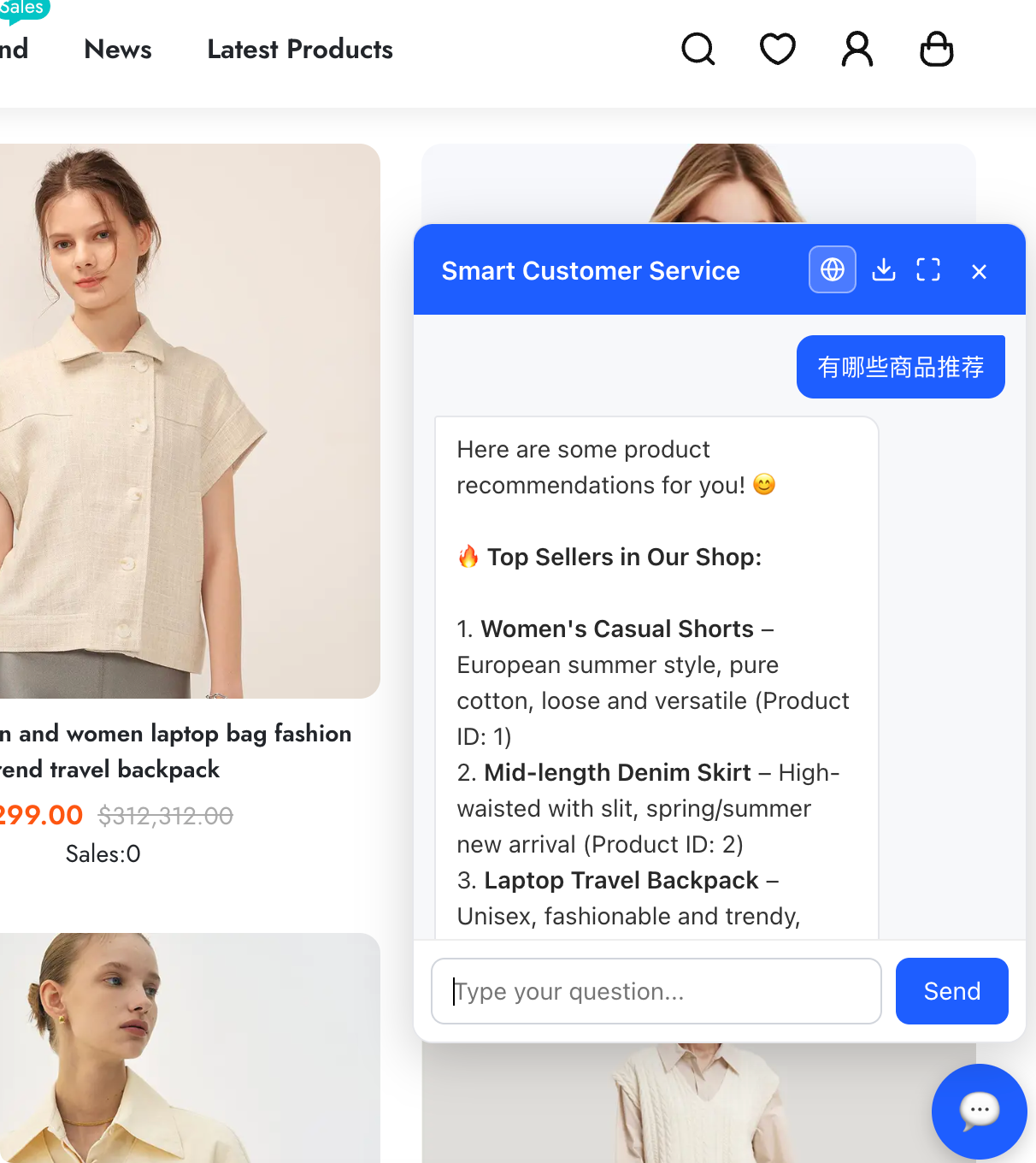
- ** Dual front desk entry ** : Floating bubble window (widget) and independent full-screen chat page. Both forms share the same set of dialogue logic and language mechanism.
- ** Session Language Lock ** : The language menu only displays the languages enabled by the system, and the default language of the system is used. After the customer manually switches, the subsequent reply is locked to the selected language, saved locally and automatically restored during the next visit. The language of the system will automatically revert to the default language if the copy is not configured.
- ** Customer Context ** : Identify the identity of the currently logged-in customer. Functions involving privacy can only query the customer's own data. The ability to automatically hide unlogged (anonymous) sessions.
- ** Automatic Response ** : Integrate large model intelligent response, automatically analyze customer problems and complete corresponding operations.
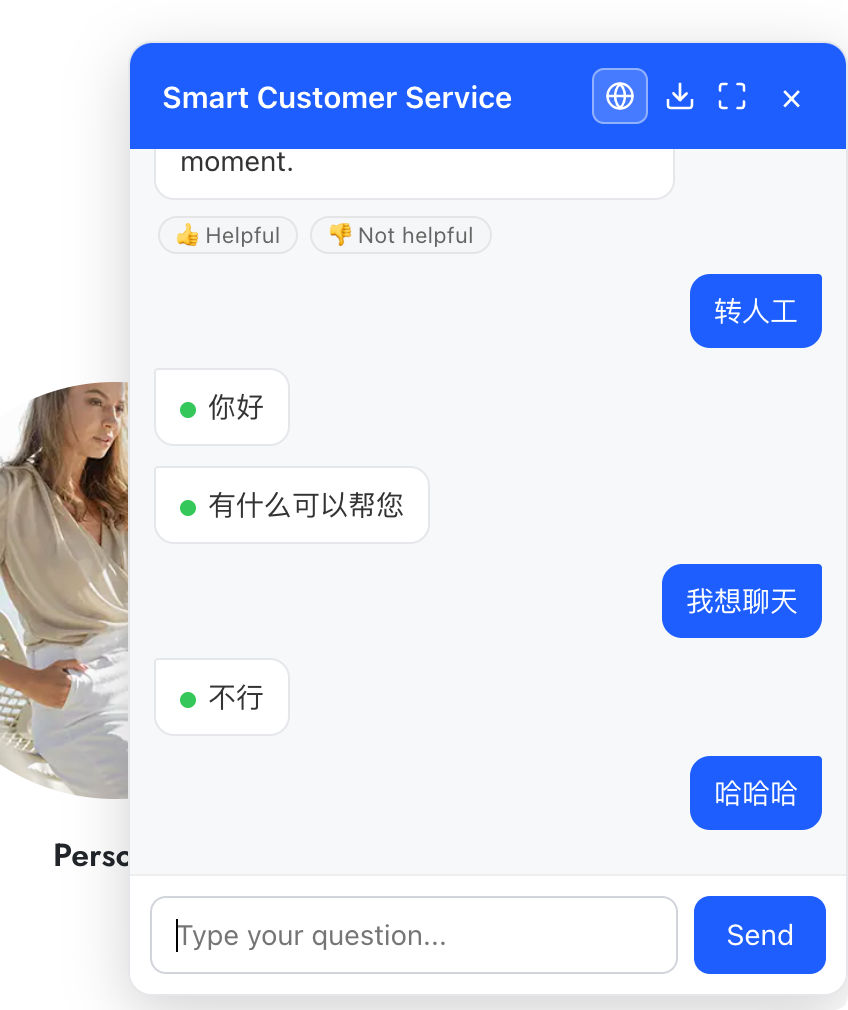
- ** Manual Transfer ** : When a customer explicitly requests a human customer service representative, a record of manual transfer processing is generated and can be pushed to the customer service staff.
- ** Push Notifications ** : Push notifications are supported for events such as new sessions and referrals to human agents.
- ** Back-end Panel ** : Session management, customer issue feedback management, knowledge base management.
"Background functions.
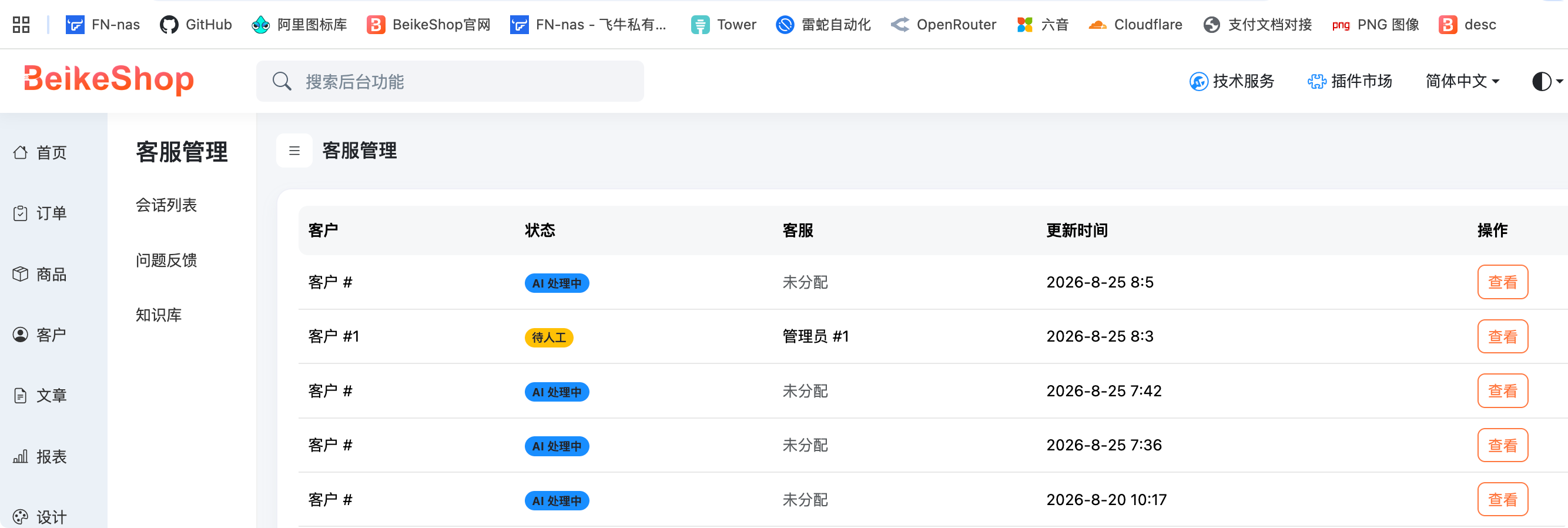
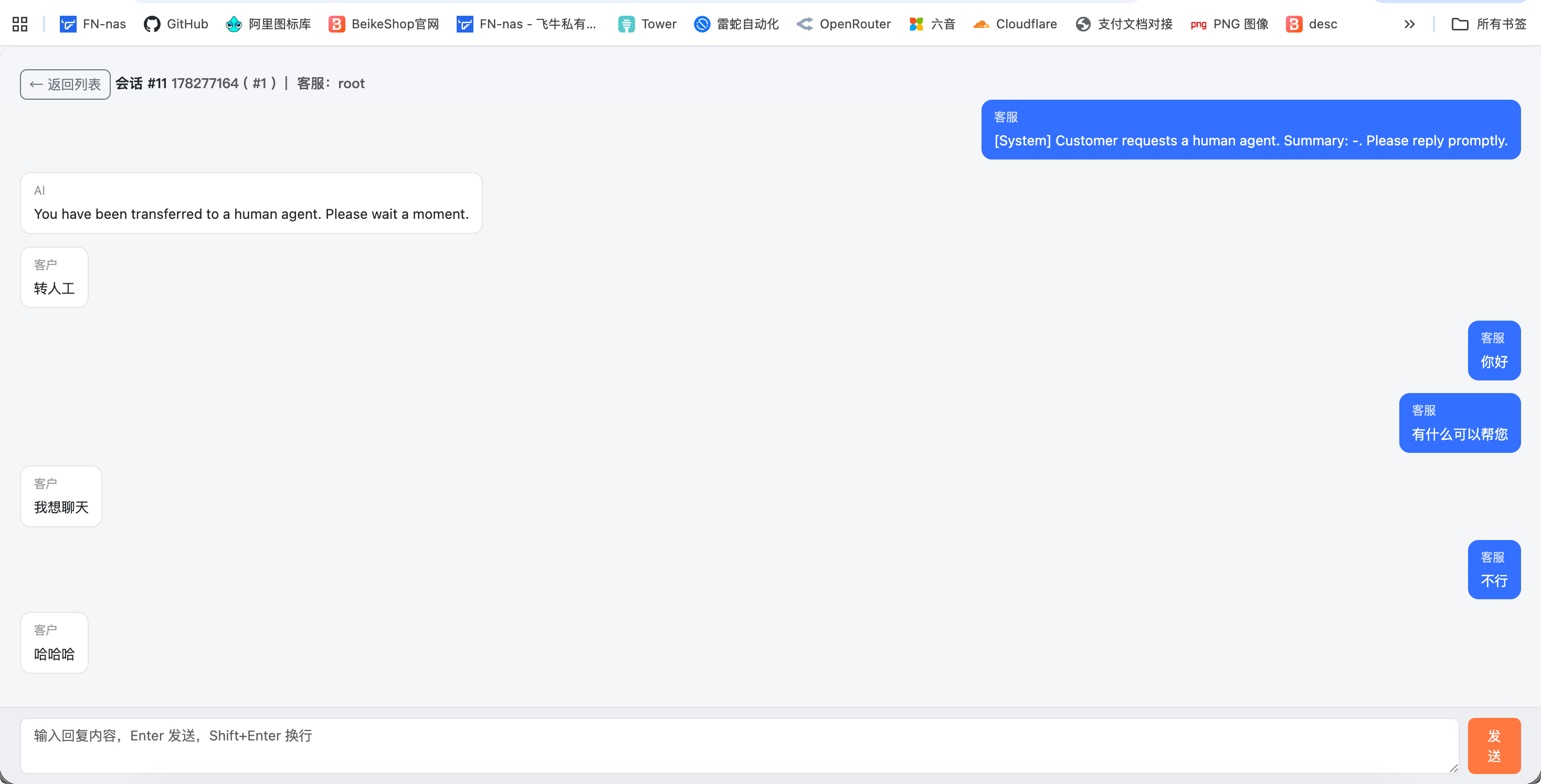
- ** Session Management ** : View customer session lists and chat records, and be able to reply directly to customers from sessions, take over manually, or close sessions.
- ** Problem Feedback ** : When a customer clicks "Useful/Not useful" in the chat to reply to the AI, the backend will record this feedback (including the customer's problem and the AI's response). Customer service can filter and view the feedback list by evaluation type, processing status, and keywords, and can one-click include satisfactory Q&A into the knowledge base.
- ** Knowledge Base ** : Customer service can maintain the Q&A entries of "Question → Standard Answer" by themselves (supporting classification, enabling and disabling). When the AI responds, it will match the customer's current question with the questions in the knowledge base. Once it hits the mark, it will provide the corresponding entry as reference materials to the large model, making the answer more in line with the standard answer preset by the customer service team.
- ** Quota and Risk Control ** : Daily quota limits are provided.
- ** Feishu Notifications ** : Critical events support Feishu robot notifications.
"Language mechanism
The language menu options come from the languages enabled by the system, are not fixedly hardcoded, and do not provide an "Auto" option. The default language is equal to the system default language 'locale()', which is consistent with the background 'base.locale'. The front-end locally saves the customer's selection (' localStorage '), and automatically restores it when opened again. Unselected or disabled languages fall back to the system's default language. The backend 'normalizeLang()' verifies whether the language is in the enabled list. Any illegal values will be reverted to the system's default language, and a speech lock instruction will be issued to the large model to ensure that the response language is consistent with the interface language.
Built-in functions
Customers can directly state their needs in the conversation, and the intelligent customer service will automatically complete the task.
- ** Shopping Cart ** : View items in the shopping cart, add items to the shopping cart, modify the quantity, delete items.
- ** Orders ** : Query your own order list (which can be filtered by status) and detailed information of individual orders.
- ** Product ** : Search for products on sale by keywords and view product details (price, inventory, specifications).
- ** Manual Transfer ** : When a customer explicitly requests a human customer service representative, the service will be automatically transferred to a human.
Supported plugins for access
Intelligent customer service can be integrated with other plugins, transforming the functions of each plugin into capabilities available in conversations. The customer service will automatically invoke them based on the customer's questions. Currently, the following plugins are supported for integration:
- **WalletPay (Balance Wallet) ** : Customers can check their wallet balance and balance details (recharge, payment, refund, withdrawal, etc.).
- **Ticket (Coupons) ** : Customers can view the coupons under their names (gift vouchers, discount coupons, which can be filtered by status).
- **LFullReduction (FullReduction Promotion) ** : Customers can learn about the current effective full reduction promotion (conditions, discount methods, and promotion time).
- **ExpressTracking (51Tracking) ** : Customers can check the logistics trajectory of their orders.
- **KuaiDi100 (Express 100) ** : Customers can check the logistics trajectory of their orders.
- **LComment (AI Smart Product Review) ** : Customers can view product reviews or their own historical reviews.
- **SalesVolume (Product SalesVolume) ** : Customers can query the sales volume of individual products or sales rankings.
Subscription Mechanism (New Message Notification)
Customers can enable "New Message Notification" on the ** full-screen chat page **. When the customer service/AI has a new reply, they can receive a system push reminder even if they are not on the chat page.
Web Push based on browser standards (requiring an HTTPS environment and browser notification permissions). No manual configuration is required. You can subscribe after authorizing your browser. If you subscribe to the same device repeatedly, the old records will be cleared first to avoid receiving notifications repeatedly. The server can push messages (title + content + jump link, with the full-screen chat page opened by default) to all subscriptions of this customer. The failure of a single push does not affect other subscriptions. When the customer is in a chat state and no push is made, the intelligent assistance will determine whether to push or not.
Front desk entrance
The plugin takes effect after being enabled and the "Customer Service Switch" is turned on in the background
- Floating widget: The lower right corner of the entire site's front page.
- Full-screen page: After opening, the floating widget will no longer be remounted.
Compatibility Instructions
The large model service is configured through plugins (API address, key, model) and is compatible with OpenAI protocol interfaces (such as DeepSeek).
Screenshots of the relevant interface Front desk conversation ! QQ_1787616334208.png
The front desk converses with the human customer service representative. The green dots indicate the speech of the human customer service representative ! QQ_1787616406641.png
Background management interface ! QQ_1787616441808.png
Back-end human customer service interface ! QQ_1787616476891.png